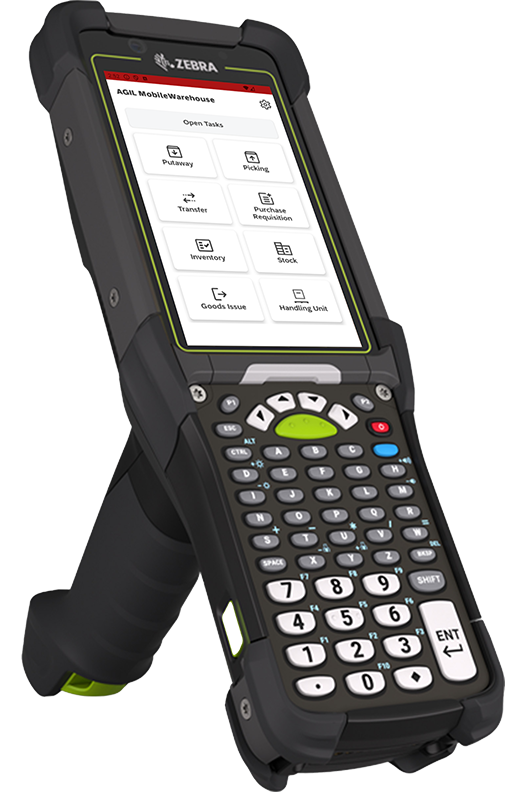
With AGIL MobileWarehouse, you can control all SAP warehouse processes directly from your Android device. Whether goods receipt, picking or stock transfer – functions ensure error-free data capture and full transparency in real time.
In day-to-day warehouse operations, paper processes, long distances to the PC and manual scanning slow your teams down noticeably.
With AGIL MobileWarehouse, your Android MDE device becomes the central control point: Using intuitive, mobile interfaces, you can access all SAP best practice processes by touch or barcode – from goods receipt to putaway and stock transfer to stocktaking.
The integrated OCR automatically reads labels and delivery bills. Thanks to machine learning, stock data is compared with live stock in real time.
You can create and pack handling units on site, bundle tasks according to delivery logic and flexibly adapt sorting rules to your processes.
This reduces travel times, avoids data entry errors and measurably increases the efficiency of your warehouse.
The advantages of AGIL MobileWarehouse
Always keep an overview
Thanks to live inventories, you can see immediately which items are available – without having to ask or deal with paperwork.
Error-free data acquisition
OCR scanning instead of typing: Automatic text recognition via OCR reduces entry errors and saves time when entering supplier labels.
Intelligent task bundling
Group picking and delivery orders to shorten routes and speed up processes.
Simple system integration
Works seamlessly with SAP S/4HANA Cloud (public/private), SAP ERP (ECC) and SAP Business ByDesign.
Always keep an overview
Thanks to live inventories, you can see immediately which items are available – without having to ask or deal with paperwork
Error-free data acquisition
OCR scanning instead of typing minimizes data entry errors and saves time when reading supplier labels
Intelligent task bundling
Group picking and delivery orders to shorten routes and speed up processes
Simple system integration
Works seamlessly with SAP S/4HANA Cloud (public/private), SAP ERP (ECC) and SAP Business ByDesign
Highlight from AGIL MobileWarehouse
Functions of the AGIL MobileWarehouse at a glance
Incoming goods & packaging
With the AGIL MobileWarehouse app, recording material is intuitive. Material information is read via scan inputs and reported back to the ERP system without any susceptibility to errors. The app can control printers to create barcode labels. Subsequent packaging or the creation of handling units is also possible at any time.
Storage
Keep the transfer zones in your warehouse operational at all times. Move goods to the designated storage location in a structured and efficient manner. The app guides you through the putaway process and also allows you to make deviations. Plausibility checks ensure correct storage bin allocation, which maintains order in the warehouse.
Inventory overview
With the stock overview, you can keep an eye on current stock levels at all times. Filter by material, storage location, handling unit or batches and call up relevant information immediately. The real-time data ensures maximum transparency and supports needs-based planning.
Stock transfer
Move material in a process-supported and uncomplicated way. The app handles the entire stock transfer process – from scanning to stock updates. This means that your stock remains correct at all times and goods movements are traceable and documented.
Order picking
Planned stock removal tasks for picking can be coordinated and processed by the logistics staff according to priority, queue, customer order or delivery. Deviations are recorded directly in the system where necessary. Always have the context-relevant details under control on the move to ensure successful, fast delivery.
Outgoing goods
AGIL MobileWarehouse allows you to manage your internal outgoing goods efficiently and reliably. Material and handling units can be booked and picked to cost centers, projects, orders or employees. Incorrect stock removals are avoided thanks to the integrated validation logic.
Handling Unit Management
Manage handling units on the move to ensure the actual status of physical containers at all times. Whether creating, deleting or managing storage units – AGIL MobileWarehouse also supports all handling unit-based processes. Necessary logistics details such as weight, volume and content are searchable and clearly displayed.
Inventory
The inventory function of AGIL MobileWarehouse enables you to take stock quickly, accurately and in an audit-proof manner. This can be done during stock removal within a process, if a bin becomes empty or planned by means of a storage area or product inventory count.
ResourceTask
If you move materials around the warehouse using resources, this function will convince you: The app bundles all warehouse tasks of a resource clearly so that your employees can process them together and efficiently.
Unplanned mass transfers can also be carried out directly from the app – with a resource as the source or destination.
Purchase requisition
Identify material bottlenecks at an early stage and trigger purchase requisitions directly from the app. Your logistics employees can initiate purchase requisitions for both stock and non-stock material – this reduces delays and ensures seamless replenishment control.
Frequently asked questions (FAQ)about the AGIL MobileWarehouse
On which devices does AGIL MobileWarehouse run?
The solution is optimized for Android MDE devices (Android 8+) and supports common barcode scanners and camera hardware.
How quickly can the app be integrated into my SAP system?
With predefined SAP best practice packages, you can start a pilot operation after 4-6 weeks.
Which SAP modules and editions are supported?
Compatible with SAP S/4HANA Cloud (public/private), SAP ERP (ECC) and SAP Business ByDesign
Start your intelligent warehouse era now!
AGIL MobileWarehouse is available for testing in the Play Store – or arrange a personal demo.
Ihre Auswahl zu Cookies auf dieser Website
Wenn Sie auf „Alle Cookies akzeptieren“ klicken, stimmen Sie der Speicherung von Cookies auf Ihrem Gerät zu, um die Websitenavigation zu verbessern, die Websitenutzung zu analysieren und unsere Marketingerlebnis zu unterstützen.
Unbedingt erforderliche Cookies
Always active
Diese Cookies ermöglichen uns die Analyse der Website-Nutzung, damit wir deren Leistung messen und verbessern können.
Präferenzen
The technical storage or access is necessary for the legitimate purpose of storing preferences that are not requested by the subscriber or user.
Leistungs-Cookies
Diese Cookies ermöglichen es uns, Besuche und Verkehrsquellen zu zählen, damit wir die Leistung unserer Website messen und verbessern können. Sie unterstützen uns bei der Beantwortung der Fragen, welche Seiten am beliebtesten sind, welche am wenigsten genutzt werden und wie sich Besucher auf der Website bewegen. Alle von diesen Cookies erfassten Informationen werden aggregiert und sind deshalb anonym. Wenn Sie diese Cookies nicht zulassen, können wir nicht wissen, wann Sie unsere Website besucht haben.The technical storage or access that is used exclusively for anonymous statistical purposes. Without a subpoena, voluntary compliance on the part of your Internet Service Provider, or additional records from a third party, information stored or retrieved for this purpose alone cannot usually be used to identify you.
Cookies für Marketing
Diese Cookies können über unsere Website von unseren Werbepartnern gesetzt werden. Sie können von diesen Unternehmen verwendet werden, um ein Profil Ihrer Interessen zu erstellen und Ihnen relevante Anzeigen auf anderen Websites zu zeigen. Sie speichern nicht direkt personenbezogene Daten, basieren jedoch auf einer einzigartigen Identifizierung Ihres Browsers und Internet-Geräts. Wenn Sie diese Cookies nicht zulassen, werden Sie weniger gezielte Werbung erleben.